7  API Requests und Auswertung [1:03:22]

“Eine besonders effektive und interessante Art auf Daten zuzugreifen ist über ›Application Programming Interfaces‹ – kurz: API. Der Begriff API ist sehr weit verbreitet, und sollte man sich in jedem Fall merken. In einer idealen Welt hätte man gar keine eigenen Datenbanken mehr, sondern würde nur noch über APIs auf Datenbanken zugreifen, sich die gewünschten Daten herunter laden, und diese dann auf dem eigenen Computer auswerten. Ein Großteil des Internets, und viele der erfolgreichsten Apps auf dem Smartphone funktionieren genau so: über ein API werden die gewünschten Daten geladen, und die App macht letztlich nicht mehr als ein Interface zur verfügung zu stellen, um diese Daten entsprechend auszuwählen und darzustellen. Das Interface ist dabei ein Graphical User Interface – kurz GUI. Ebenfalls ein Begriff, den man kennen sollte. Eine GUI ist letztlich nichts anders als das, was wir mit ›Interact‹ kennen gelernt haben. D.h., mit einer API und einer GUI machen wir exakt das, was fast jede unserer App auf dem Smartphone macht. Das hört sich alles großartig an – und ist es auch! Wäre da nicht das eine Problem: viele geowissenschaftliche Datenbanken haben – noch – keine vernünftige API. Glücklicherweise ändert sich daran gerade viel. Fun Fact Wir hier in Frankfurt sind an dieser Änderung recht zentral beteiligt.”

7.1 Basics- Welche online-Datenbanken u.ä. gibt es?  [04:39]

Um 2000 herum begannen ein paar erste Initiativen damit mineralogische Datenbanken aufzubauen. Zu den Pionieren gehören sicherlich die GeoROC Datenbank am Max-Planck Institut für Geochemie in Mainz, die EarthChem Datenbank am Lamont-Doherty Earth Observatory, sowie die MetBase, welche von einem privaten Enthusiasten aufgebaut wurde. Die ersten beiden Datenbanken enthalten primär Gesteinsdaten, sind also geochemisch orientiert, wohingegen die MetBase eine kosmoschemische Datenbank mit Meteoriten-Daten ist. Zusätzlich gibt es Konsortien (NFDI4Earth, Research Data Alliance, European Open Science Cloud (EOSC), die selbst keine Datenbanken betreiben, sondern Standards, Schnittstellen, etc. definieren, und einen zentralen Zugangspunkt zu den verschiedenen Datenbanken anbieten. Das gibt es außerdem nicht nur für Daten, sondern auch für Labore (EPOS) oder die Lehre.

7.2 Basics- Dictionary – another type of list  [12:36]

{ }  (-> Dictionary brackets), pd.DataFrame() 
Available Notebooks: Lecture, Exercise, Solution

Daten, die man sich aus online-Datenbanken zieht sind häufig in Listen des Typs Dictionary (z.B. json Formate). Dictionary sind schnell zugänglich und leicht verständlich nachdem wir nun Pandas DataFrames kenne – und können auch direkt in diese umformatiert werden. 

[1, 2, 3, 4, 5]
[1, 2, 3, 4, 5]
dict1 = {
    'Name': ['Dominik', 'Claudia', 'Chantal', 'Mark'],
    'Height': [190, 192, 176, 181]  # in cm
}
dict1
{'Name': ['Dominik', 'Claudia', 'Chantal', 'Mark'],
 'Height': [190, 192, 176, 181]}
import pandas as pd
pd.DataFrame(dict1)
Name Height
0 Dominik 190
1 Claudia 192
2 Chantal 176
3 Mark 181
dict2 = {
    'Name': ['Dominik', 'Claudia', 'Chantal', 'Mark'],
    'body parameters': {'Height': [190, 192, 176, 181], 'Weight': [94, 92, 71, 105], 'eye colour': ['blue', 'green', 'brown']}
}
dict2['body parameters']['eye colour'][0]
'blue'
dict3 = {
    'animal': 'cat',
    'name': 'furbal',
    vaccinated: 'yes',
    'born': 2018
    'legs': 4
}

curly bracktes – square brackets
have keys – no keys
elements can be accessed using keys – apparently not, as no keys in ‘normal’ lists

Key – Value pairs
The key is before the colon, basically a category name, and the values are single values or a list of values after the colon

True

False

True

False

True

False

Produce a dictionary with 3 keys and variable lengths of the values
Convert this dictionary into a pandas dataframe
Produce a dictionary with an additional dictionary nested within this dictionary
Extract various elements from this dictionray
Try and convert this nested dictionary into a DataFrame. Try and understand what happened.

dict = {
    'Name': ['Dominik', 'Claudia', 'Chantal', 'Mark'],
    'Height': [190, 192, 176, 181]
}
# Selecting all Georoc files from mag4
import pandas as pd
pd.DataFrame(dict)
Name Height
0 Dominik 190
1 Claudia 192
2 Chantal 176
3 Mark 181
dict2 = {
    'Name': ['Dominik', 'Claudia', 'Chantal', 'Mark'],
    'body parameters': {'Height': [190, 192, 176, 181], 'Weight': [94, 92, 71, 105], 'eye colour': ['blue', 'green', 'brown']}
}
print(dict2['Name'][1])

print(dict2['body parameters']['eye colour'][2])

print(dict2['body parameters']['Weight'][0])
Claudia
brown
94
pd.DataFrame(dict2)
dict = {
    'brand': 'Apple',
    'OS': 'macOS',
    memory: '64 GB',
    'year build': 2014
}

memory needs to be a string

dict = {
    'city': ['Swakopmund', 'Timbuktu', 'Ulan Bator']
    'population': [45000, 54000, 1452000]
    'hair colour': ['black', 'brown', 'red', 'blond', 'grey', 'none']
}

commas after each entry are missing

for i in [1, 2, 3]
    print(i ** 3)

colon at the end of ‘for …’ missing

7.3 Command- API requests  [20:40]

requests,  .get(), json, str() 
Available Notebooks: Lecture, Exercise, Solution

Was ist eine API? Ein Application Programming Interface. Das sagt kaum mehr. Es ist eine Schnittstelle. Hilft vielleicht etwas. Angenommen, wir wollen die aktuellen Wetterdaten einer Stadt wissen. Dann können wir eine Anfrage (request) an einen Server stellen, und bekommen die Wetterdaten geliefert. Hört sich einfach an – und ist es tatsächlich auch. In dieser Einheit lernen wir also, wie wir sehr einfach Daten von einem Server in unser Jupyter Notebook laden, und dort darstellen, weiter verarbeiten, visualisieren, etc. können. 

Be aware that no example results are shown, as the code is not executed. It would require an API key, which I cannot publicly provide here.

import requests, json
city = 'Frankfurt'

url = 'http://api.openweathermap.org/data/2.5/weather?q=' + city + '&appid={apikey}'   #you need to get your own api!

r = requests.get(url)
r
print(r.text)
res = r.json()
res
res['main']['temp'] - 273.15
print('The weather in ' + city + ' is:')
print('Temperature: ' + str(round(res['main']['temp'] - 273.15, 1)))
print('Wind Speed: ' + str(res['wind']['speed']) + ' m/s')
print('The sky looks: ' + str(res['weather'][0]['description']) + '...')
nr = 109359

url = 'https://api.geosamples.org/v1/sample/id/' + str(1000 + nr)

r = requests.get(url)

res = r.json()
res
#nr = 109359

for nr in range(10):
    url = 'https://api.geosamples.org/v1/sample/id/' + str(1000 + nr)

    r = requests.get(url)

    print(r.json())

It is a web-address to connect to a database server to e.g., request data for download. API means application interface.

https://api.mineralogydata.org/version1/minerals?q=tourmaline&appid=mystrongpassword123

excel file

list

dictionary

True

False

It seems the geosamples API currently dos no longer works as intended. I’ll try and find a new example soon, e.g., using Wikidata
Find a free/open API, e.g., on: https://www.geosamples.org. If you chose this, use SampleType, and from the list choose the last ‘sample’
Import the required commands
Make the API flexible, i.e., with the above example make the sample name flexible
Use the api url to make a request. Check whether you get a correct response
Select one sample and convert the data in json
Display a sensible selection of the result
Extract longitude and latitude from the 10 first samples into a list. Then from all samples

Now for a challenge: Try and extract longitude and latitude from all samples into a list
You will get an error. Find out what the problem is, solve it – and get the list
Hint You will need the – in a general syntax – ‘if key in dict:’

import requests, json
sampleType = 'basalt'
url = 'https://api.geosamples.org/v1/samples?name=' + sampleType
r = requests.get(url)
print(r.text)
res = r.json()
res[10]
print(res[10]['description'])
print(res[10]['primaryLocationType'])
print(res[10]['launchPlatformName'])
print(res[10]['sampleComment'])
latLong = []

for i in range(10):
    latLong.append([res[i]['latitude'], res[i]['longitude']])
    
latLong
latLong = []

for i in range(len(res)):
    if 'latitude' in res[i]:
        latLong.append([res[i]['latitude'], res[i]['longitude']])
    
latLong
def addTwo(number):
    result = number + 2

result

res is a local variable. No result will be displayed. Add a line in def ‘return result’ and execute the command name -> ‘addTwo()’ with a value.

import pandas as pd

df = pd.DataFrame{
    'student': ['Miriam', 'Jens', 'Jericho'],
    'city': ['Flörsheim', 'Bad Soden', 'Eschborn'],
    'age': [23, 21, 25]
    }

Brackets are missing after DataFrame and around the dictionary list -> pd.DataFrame({...})

After you solved the previous, what is the problem with:

import pandas as pd

df = pd.DataFrame({
    'student': ['Miriam', 'Jens', 'Jericho'],
    'city': ['Flörsheim', 'Bad Soden', 'Eschborn'],
    'age': [23, 21, 25]
    })

df.iloc[[0, 2], 'age']

Must be .loc, not iloc when ‘age’ is used – which is a string.

And here?

df.loc[[0, 3], 'age']

Only 3 series, not 4, and the count starts with 0, i.e, the third column is 2.

7.4 Basics- Manipulating row, columns, filters (again), etc. using pandas  [13:55]

~filter, .isin(), .str.contains(), .index, .value_count(), .rename, export, .to_csv, .to_excel 

In dieser zweiten Einheit zu Pandas lernen wir weitere Möglichkeiten um Daten in pandas dataframes zu manipulieren, zählen, exportieren, etc. Es macht jedoch keinen Sinn, in diesem Kurs den vollständigen Umfang von Pandas – oder jeglicher anderer Python-Bibliothek – darzustellen. Vielmehr sucht man sich je nach zu lösender Fragestellung die nötigen Befehle aus dem persönlichen Fundus plus der entsprechenden Recherche in den einschlägigen Ressourcen aus dem Internet zusammen. 

pip install mag4
Requirement already satisfied: mag4 in /Users/dominik/anaconda3/lib/python3.11/site-packages (0.0.214)
Note: you may need to restart the kernel to use updated packages.
import pandas as pd
import mag4 as mg
df = mg.get_data('Mineral Data Example Dataset')
df
mineral oxygens sample no. SiO2 TiO2 Al2O3 Cr2O3 FeO MnO ... Al Cr Fe Mn Ni Mg Ca Na K total cations
0 ol 4 chd#2 1 42.51 0.04 0.07 0.04 0.18 0.00 ... 0.002 0.001 0.004 0.000 0.000 1.944 0.040 0.000 0.000 2.995
1 ol 4 chd#2 9 42.16 0.10 0.06 0.20 3.14 0.07 ... 0.002 0.004 0.063 0.001 0.001 1.910 0.006 0.000 0.000 2.992
2 cpx 6 chd#2 4 52.33 2.00 4.09 0.81 0.32 0.10 ... 0.172 0.023 0.010 0.003 0.000 1.037 0.805 0.001 0.000 3.977
3 cpx 6 chd#2 6 51.54 1.74 5.72 0.56 0.67 0.09 ... 0.241 0.016 0.020 0.003 0.000 1.019 0.795 0.003 0.000 3.984
4 opx 6 chd#2 8 57.09 0.22 0.76 0.48 1.92 0.08 ... 0.031 0.013 0.055 0.002 0.001 1.897 0.025 0.001 0.000 4.002
5 opx 6 chd#2 10 59.19 0.19 0.63 0.51 0.67 0.20 ... 0.025 0.014 0.019 0.006 0.001 1.906 0.024 0.001 0.000 3.988
6 cpx 6 chd#2 11 58.33 0.30 0.98 0.53 0.33 0.14 ... 0.039 0.014 0.009 0.004 0.000 1.754 0.182 0.001 0.000 3.989
7 cpx 6 chd#2 12 53.87 1.10 3.09 0.51 0.21 0.08 ... 0.129 0.014 0.006 0.002 0.000 1.164 0.731 0.000 0.000 3.988
8 fs 8 chd#2 3 47.10 0.06 32.39 0.01 0.21 0.00 ... 1.754 0.000 0.008 0.000 0.000 0.073 0.885 0.143 0.000 5.029
9 fs 8 chd#2 5 47.72 0.06 31.87 0.01 0.71 0.03 ... 1.732 0.000 0.027 0.001 0.000 0.040 0.834 0.190 0.000 5.026
10 ol 4 chd#3 15 42.72 0.05 1.08 0.11 0.37 0.01 ... 0.030 0.002 0.007 0.000 0.000 1.904 0.017 0.024 0.000 2.991
11 ol 4 chd#3 17 42.83 0.03 0.11 0.16 0.45 0.00 ... 0.003 0.003 0.009 0.000 0.000 1.961 0.012 0.000 0.000 2.992
12 ol 4 chd#3 18 40.43 0.02 0.03 0.11 11.16 0.00 ... 0.001 0.002 0.233 0.000 0.000 1.733 0.009 0.000 0.000 2.989
13 ol 4 chd#3 21 42.46 0.05 0.27 0.10 0.32 0.03 ... 0.008 0.002 0.006 0.001 0.000 1.951 0.014 0.000 0.000 2.989
14 cpx 6 chd#3 16 45.09 0.56 22.45 0.36 3.62 0.00 ... 0.928 0.010 0.106 0.000 0.000 0.720 0.560 0.033 0.000 3.952
15 cpx 6 chd#3 19 46.72 1.91 22.05 0.76 0.64 0.00 ... 0.922 0.021 0.019 0.000 0.001 0.388 0.742 0.034 0.000 3.837
16 fsp/mes 8 chd#3 20 46.36 0.67 27.52 0.26 0.53 0.00 ... 1.516 0.010 0.021 0.000 0.005 0.330 0.947 0.053 0.000 5.073
17 fsp/mes 8 chd#3 25 47.78 1.23 22.21 0.69 1.17 0.00 ... 1.218 0.025 0.046 0.000 0.000 0.611 0.892 0.106 0.000 5.164
18 sp 4 #24 - CAI 74 0.59 0.27 67.71 0.63 5.54 0.03 ... 1.972 0.012 0.115 0.001 0.000 0.863 0.004 0.003 0.000 2.990
19 ol/sp 4 #24 - CAI 76 35.13 0.58 14.39 0.30 8.06 0.05 ... 0.428 0.006 0.170 0.001 0.000 1.246 0.111 0.051 0.004 2.913
20 ol/sp 4 #24 - CAI 77 35.52 0.49 25.58 0.29 4.88 0.02 ... 0.729 0.006 0.099 0.000 0.000 0.631 0.406 0.057 0.001 2.794
21 sp 4 #24 - CAI 84 3.24 1.36 65.06 0.08 3.05 0.01 ... 1.826 0.002 0.061 0.000 0.000 0.984 0.010 0.001 0.000 2.985
22 sp 4 #24 - CAI 85 0.16 0.51 69.36 0.26 2.41 0.00 ... 1.988 0.005 0.049 0.000 0.000 0.932 0.002 0.000 0.000 2.990
23 cpx 6 #24 - CAI 75 51.72 0.20 3.27 0.05 0.27 0.02 ... 0.142 0.001 0.008 0.001 0.000 0.973 0.959 0.031 0.002 4.031
24 cpx 6 #24 - CAI 81 32.79 1.35 26.06 0.46 2.53 0.03 ... 1.150 0.014 0.079 0.001 0.000 0.975 0.632 0.058 0.010 4.185

25 rows × 28 columns

A complementary look into filters
Simple filter

fil = (df['mineral'] == 'ol') | (df['mineral'] == 'sp')
df[fil]
mineral oxygens sample no. SiO2 TiO2 Al2O3 Cr2O3 FeO MnO ... Al Cr Fe Mn Ni Mg Ca Na K total cations
0 ol 4 chd#2 1 42.51 0.04 0.07 0.04 0.18 0.00 ... 0.002 0.001 0.004 0.000 0.000 1.944 0.040 0.000 0.0 2.995
1 ol 4 chd#2 9 42.16 0.10 0.06 0.20 3.14 0.07 ... 0.002 0.004 0.063 0.001 0.001 1.910 0.006 0.000 0.0 2.992
10 ol 4 chd#3 15 42.72 0.05 1.08 0.11 0.37 0.01 ... 0.030 0.002 0.007 0.000 0.000 1.904 0.017 0.024 0.0 2.991
11 ol 4 chd#3 17 42.83 0.03 0.11 0.16 0.45 0.00 ... 0.003 0.003 0.009 0.000 0.000 1.961 0.012 0.000 0.0 2.992
12 ol 4 chd#3 18 40.43 0.02 0.03 0.11 11.16 0.00 ... 0.001 0.002 0.233 0.000 0.000 1.733 0.009 0.000 0.0 2.989
13 ol 4 chd#3 21 42.46 0.05 0.27 0.10 0.32 0.03 ... 0.008 0.002 0.006 0.001 0.000 1.951 0.014 0.000 0.0 2.989
18 sp 4 #24 - CAI 74 0.59 0.27 67.71 0.63 5.54 0.03 ... 1.972 0.012 0.115 0.001 0.000 0.863 0.004 0.003 0.0 2.990
21 sp 4 #24 - CAI 84 3.24 1.36 65.06 0.08 3.05 0.01 ... 1.826 0.002 0.061 0.000 0.000 0.984 0.010 0.001 0.0 2.985
22 sp 4 #24 - CAI 85 0.16 0.51 69.36 0.26 2.41 0.00 ... 1.988 0.005 0.049 0.000 0.000 0.932 0.002 0.000 0.0 2.990

9 rows × 28 columns

Get the complementary data from the filter

df[~fil]
mineral oxygens sample no. SiO2 TiO2 Al2O3 Cr2O3 FeO MnO ... Al Cr Fe Mn Ni Mg Ca Na K total cations
2 cpx 6 chd#2 4 52.33 2.00 4.09 0.81 0.32 0.10 ... 0.172 0.023 0.010 0.003 0.000 1.037 0.805 0.001 0.000 3.977
3 cpx 6 chd#2 6 51.54 1.74 5.72 0.56 0.67 0.09 ... 0.241 0.016 0.020 0.003 0.000 1.019 0.795 0.003 0.000 3.984
4 opx 6 chd#2 8 57.09 0.22 0.76 0.48 1.92 0.08 ... 0.031 0.013 0.055 0.002 0.001 1.897 0.025 0.001 0.000 4.002
5 opx 6 chd#2 10 59.19 0.19 0.63 0.51 0.67 0.20 ... 0.025 0.014 0.019 0.006 0.001 1.906 0.024 0.001 0.000 3.988
6 cpx 6 chd#2 11 58.33 0.30 0.98 0.53 0.33 0.14 ... 0.039 0.014 0.009 0.004 0.000 1.754 0.182 0.001 0.000 3.989
7 cpx 6 chd#2 12 53.87 1.10 3.09 0.51 0.21 0.08 ... 0.129 0.014 0.006 0.002 0.000 1.164 0.731 0.000 0.000 3.988
8 fs 8 chd#2 3 47.10 0.06 32.39 0.01 0.21 0.00 ... 1.754 0.000 0.008 0.000 0.000 0.073 0.885 0.143 0.000 5.029
9 fs 8 chd#2 5 47.72 0.06 31.87 0.01 0.71 0.03 ... 1.732 0.000 0.027 0.001 0.000 0.040 0.834 0.190 0.000 5.026
14 cpx 6 chd#3 16 45.09 0.56 22.45 0.36 3.62 0.00 ... 0.928 0.010 0.106 0.000 0.000 0.720 0.560 0.033 0.000 3.952
15 cpx 6 chd#3 19 46.72 1.91 22.05 0.76 0.64 0.00 ... 0.922 0.021 0.019 0.000 0.001 0.388 0.742 0.034 0.000 3.837
16 fsp/mes 8 chd#3 20 46.36 0.67 27.52 0.26 0.53 0.00 ... 1.516 0.010 0.021 0.000 0.005 0.330 0.947 0.053 0.000 5.073
17 fsp/mes 8 chd#3 25 47.78 1.23 22.21 0.69 1.17 0.00 ... 1.218 0.025 0.046 0.000 0.000 0.611 0.892 0.106 0.000 5.164
19 ol/sp 4 #24 - CAI 76 35.13 0.58 14.39 0.30 8.06 0.05 ... 0.428 0.006 0.170 0.001 0.000 1.246 0.111 0.051 0.004 2.913
20 ol/sp 4 #24 - CAI 77 35.52 0.49 25.58 0.29 4.88 0.02 ... 0.729 0.006 0.099 0.000 0.000 0.631 0.406 0.057 0.001 2.794
23 cpx 6 #24 - CAI 75 51.72 0.20 3.27 0.05 0.27 0.02 ... 0.142 0.001 0.008 0.001 0.000 0.973 0.959 0.031 0.002 4.031
24 cpx 6 #24 - CAI 81 32.79 1.35 26.06 0.46 2.53 0.03 ... 1.150 0.014 0.079 0.001 0.000 0.975 0.632 0.058 0.010 4.185

16 rows × 28 columns

If only part of a name is known
.isin()

fil = df['mineral'].isin(['ol','sp','fs'])
df.loc[fil]
mineral oxygens sample no. SiO2 TiO2 Al2O3 Cr2O3 FeO MnO ... Al Cr Fe Mn Ni Mg Ca Na K total cations
0 ol 4 chd#2 1 42.51 0.04 0.07 0.04 0.18 0.00 ... 0.002 0.001 0.004 0.000 0.000 1.944 0.040 0.000 0.0 2.995
1 ol 4 chd#2 9 42.16 0.10 0.06 0.20 3.14 0.07 ... 0.002 0.004 0.063 0.001 0.001 1.910 0.006 0.000 0.0 2.992
8 fs 8 chd#2 3 47.10 0.06 32.39 0.01 0.21 0.00 ... 1.754 0.000 0.008 0.000 0.000 0.073 0.885 0.143 0.0 5.029
9 fs 8 chd#2 5 47.72 0.06 31.87 0.01 0.71 0.03 ... 1.732 0.000 0.027 0.001 0.000 0.040 0.834 0.190 0.0 5.026
10 ol 4 chd#3 15 42.72 0.05 1.08 0.11 0.37 0.01 ... 0.030 0.002 0.007 0.000 0.000 1.904 0.017 0.024 0.0 2.991
11 ol 4 chd#3 17 42.83 0.03 0.11 0.16 0.45 0.00 ... 0.003 0.003 0.009 0.000 0.000 1.961 0.012 0.000 0.0 2.992
12 ol 4 chd#3 18 40.43 0.02 0.03 0.11 11.16 0.00 ... 0.001 0.002 0.233 0.000 0.000 1.733 0.009 0.000 0.0 2.989
13 ol 4 chd#3 21 42.46 0.05 0.27 0.10 0.32 0.03 ... 0.008 0.002 0.006 0.001 0.000 1.951 0.014 0.000 0.0 2.989
18 sp 4 #24 - CAI 74 0.59 0.27 67.71 0.63 5.54 0.03 ... 1.972 0.012 0.115 0.001 0.000 0.863 0.004 0.003 0.0 2.990
21 sp 4 #24 - CAI 84 3.24 1.36 65.06 0.08 3.05 0.01 ... 1.826 0.002 0.061 0.000 0.000 0.984 0.010 0.001 0.0 2.985
22 sp 4 #24 - CAI 85 0.16 0.51 69.36 0.26 2.41 0.00 ... 1.988 0.005 0.049 0.000 0.000 0.932 0.002 0.000 0.0 2.990

11 rows × 28 columns

Select datasets that contain a specific string in a series

fil = df['mineral'].str.contains('fs')
df[fil]
mineral oxygens sample no. SiO2 TiO2 Al2O3 Cr2O3 FeO MnO ... Al Cr Fe Mn Ni Mg Ca Na K total cations
8 fs 8 chd#2 3 47.10 0.06 32.39 0.01 0.21 0.00 ... 1.754 0.000 0.008 0.000 0.000 0.073 0.885 0.143 0.0 5.029
9 fs 8 chd#2 5 47.72 0.06 31.87 0.01 0.71 0.03 ... 1.732 0.000 0.027 0.001 0.000 0.040 0.834 0.190 0.0 5.026
16 fsp/mes 8 chd#3 20 46.36 0.67 27.52 0.26 0.53 0.00 ... 1.516 0.010 0.021 0.000 0.005 0.330 0.947 0.053 0.0 5.073
17 fsp/mes 8 chd#3 25 47.78 1.23 22.21 0.69 1.17 0.00 ... 1.218 0.025 0.046 0.000 0.000 0.611 0.892 0.106 0.0 5.164

4 rows × 28 columns

An additional selection of selection options
Extract specific data (extractData())

cIdf = mg.get_data('Chondrite Element Abundances')
cIdf
z symbol unit CI solar abundance CM CV CO CK CR CH H L LL EH EL R K
0 1 H wt% 2.02 2.880000e+10 1.40 0.28 0.07 NaN NaN NaN NaN NaN NaN NaN NaN NaN NaN
1 2 He NaN NaN 2.290000e+09 NaN NaN NaN NaN NaN NaN NaN NaN NaN NaN NaN NaN NaN
2 3 Li ppm 1.50 5.547000e+01 1.50 1.70 1.80 1.4 NaN NaN NaN NaN NaN NaN NaN NaN NaN
3 4 Be ppm 0.03 7.370000e-01 0.04 0.05 NaN NaN NaN NaN NaN NaN NaN NaN NaN NaN NaN
4 5 B ppm 0.87 1.732000e+01 0.48 0.30 NaN NaN NaN NaN NaN NaN NaN NaN NaN NaN NaN
... ... ... ... ... ... ... ... ... ... ... ... ... ... ... ... ... ... ...
82 83 Bi ppb 110.00 1.388000e-01 71.00 54.00 35.00 20.0 40.0 NaN NaN NaN NaN NaN NaN NaN NaN
83 89 Ac NaN NaN NaN NaN NaN NaN NaN NaN NaN NaN NaN NaN NaN NaN NaN NaN
84 90 Th ppb 29.00 NaN 41.00 58.00 80.00 58.0 42.0 NaN NaN NaN NaN NaN NaN NaN NaN
85 91 Pa NaN NaN NaN NaN NaN NaN NaN NaN NaN NaN NaN NaN NaN NaN NaN NaN
86 92 U ppb 8.00 NaN 12.00 17.00 18.00 15.0 13.0 NaN NaN NaN NaN NaN NaN NaN NaN

87 rows × 18 columns

cIdf.loc[84, 'CM']
41.0

Be aware that in the video nb it is called 'Element', not 'symbol', as no required

indexEl = cIdf.index[cIdf['symbol'] == 'Th'][0]
cIdf.loc[indexEl, 'CM']
41.0
def extractData(catCol, elCol, catRow):
    indexEl = cIdf.index[cIdf[catCol] == elCol][0]
    res = cIdf.loc[indexEl, catRow]
    return res
extractData('symbol', 'Al', 'CO')
1.4

List Operations
Count the number of identical elements

df['mineral'].value_counts()
mineral
cpx        8
ol         6
sp         3
opx        2
fs         2
fsp/mes    2
ol/sp      2
Name: count, dtype: int64

Rename Columns

newNames = {'SiO2':'SiO2 (wt%)', 'TiO2':'TiO2 (wt%)'}
df.rename(columns = newNames, inplace = True)
df
mineral oxygens sample no. SiO2 (wt%) TiO2 (wt%) Al2O3 Cr2O3 FeO MnO ... Al Cr Fe Mn Ni Mg Ca Na K total cations
0 ol 4 chd#2 1 42.51 0.04 0.07 0.04 0.18 0.00 ... 0.002 0.001 0.004 0.000 0.000 1.944 0.040 0.000 0.000 2.995
1 ol 4 chd#2 9 42.16 0.10 0.06 0.20 3.14 0.07 ... 0.002 0.004 0.063 0.001 0.001 1.910 0.006 0.000 0.000 2.992
2 cpx 6 chd#2 4 52.33 2.00 4.09 0.81 0.32 0.10 ... 0.172 0.023 0.010 0.003 0.000 1.037 0.805 0.001 0.000 3.977
3 cpx 6 chd#2 6 51.54 1.74 5.72 0.56 0.67 0.09 ... 0.241 0.016 0.020 0.003 0.000 1.019 0.795 0.003 0.000 3.984
4 opx 6 chd#2 8 57.09 0.22 0.76 0.48 1.92 0.08 ... 0.031 0.013 0.055 0.002 0.001 1.897 0.025 0.001 0.000 4.002
5 opx 6 chd#2 10 59.19 0.19 0.63 0.51 0.67 0.20 ... 0.025 0.014 0.019 0.006 0.001 1.906 0.024 0.001 0.000 3.988
6 cpx 6 chd#2 11 58.33 0.30 0.98 0.53 0.33 0.14 ... 0.039 0.014 0.009 0.004 0.000 1.754 0.182 0.001 0.000 3.989
7 cpx 6 chd#2 12 53.87 1.10 3.09 0.51 0.21 0.08 ... 0.129 0.014 0.006 0.002 0.000 1.164 0.731 0.000 0.000 3.988
8 fs 8 chd#2 3 47.10 0.06 32.39 0.01 0.21 0.00 ... 1.754 0.000 0.008 0.000 0.000 0.073 0.885 0.143 0.000 5.029
9 fs 8 chd#2 5 47.72 0.06 31.87 0.01 0.71 0.03 ... 1.732 0.000 0.027 0.001 0.000 0.040 0.834 0.190 0.000 5.026
10 ol 4 chd#3 15 42.72 0.05 1.08 0.11 0.37 0.01 ... 0.030 0.002 0.007 0.000 0.000 1.904 0.017 0.024 0.000 2.991
11 ol 4 chd#3 17 42.83 0.03 0.11 0.16 0.45 0.00 ... 0.003 0.003 0.009 0.000 0.000 1.961 0.012 0.000 0.000 2.992
12 ol 4 chd#3 18 40.43 0.02 0.03 0.11 11.16 0.00 ... 0.001 0.002 0.233 0.000 0.000 1.733 0.009 0.000 0.000 2.989
13 ol 4 chd#3 21 42.46 0.05 0.27 0.10 0.32 0.03 ... 0.008 0.002 0.006 0.001 0.000 1.951 0.014 0.000 0.000 2.989
14 cpx 6 chd#3 16 45.09 0.56 22.45 0.36 3.62 0.00 ... 0.928 0.010 0.106 0.000 0.000 0.720 0.560 0.033 0.000 3.952
15 cpx 6 chd#3 19 46.72 1.91 22.05 0.76 0.64 0.00 ... 0.922 0.021 0.019 0.000 0.001 0.388 0.742 0.034 0.000 3.837
16 fsp/mes 8 chd#3 20 46.36 0.67 27.52 0.26 0.53 0.00 ... 1.516 0.010 0.021 0.000 0.005 0.330 0.947 0.053 0.000 5.073
17 fsp/mes 8 chd#3 25 47.78 1.23 22.21 0.69 1.17 0.00 ... 1.218 0.025 0.046 0.000 0.000 0.611 0.892 0.106 0.000 5.164
18 sp 4 #24 - CAI 74 0.59 0.27 67.71 0.63 5.54 0.03 ... 1.972 0.012 0.115 0.001 0.000 0.863 0.004 0.003 0.000 2.990
19 ol/sp 4 #24 - CAI 76 35.13 0.58 14.39 0.30 8.06 0.05 ... 0.428 0.006 0.170 0.001 0.000 1.246 0.111 0.051 0.004 2.913
20 ol/sp 4 #24 - CAI 77 35.52 0.49 25.58 0.29 4.88 0.02 ... 0.729 0.006 0.099 0.000 0.000 0.631 0.406 0.057 0.001 2.794
21 sp 4 #24 - CAI 84 3.24 1.36 65.06 0.08 3.05 0.01 ... 1.826 0.002 0.061 0.000 0.000 0.984 0.010 0.001 0.000 2.985
22 sp 4 #24 - CAI 85 0.16 0.51 69.36 0.26 2.41 0.00 ... 1.988 0.005 0.049 0.000 0.000 0.932 0.002 0.000 0.000 2.990
23 cpx 6 #24 - CAI 75 51.72 0.20 3.27 0.05 0.27 0.02 ... 0.142 0.001 0.008 0.001 0.000 0.973 0.959 0.031 0.002 4.031
24 cpx 6 #24 - CAI 81 32.79 1.35 26.06 0.46 2.53 0.03 ... 1.150 0.014 0.079 0.001 0.000 0.975 0.632 0.058 0.010 4.185

25 rows × 28 columns

Take everything with you
Export a dataframe

df.to_csv('output/test.csv', index = False)
df.to_excel('output/test.xlsx', index = False)
pd.read_excel('output/test.xlsx')

Exercises are in preparation

7.5 Program- Analysing the Eu-anomaly  [16:40]

Available Notebooks: Lecture, Exercise, Solution

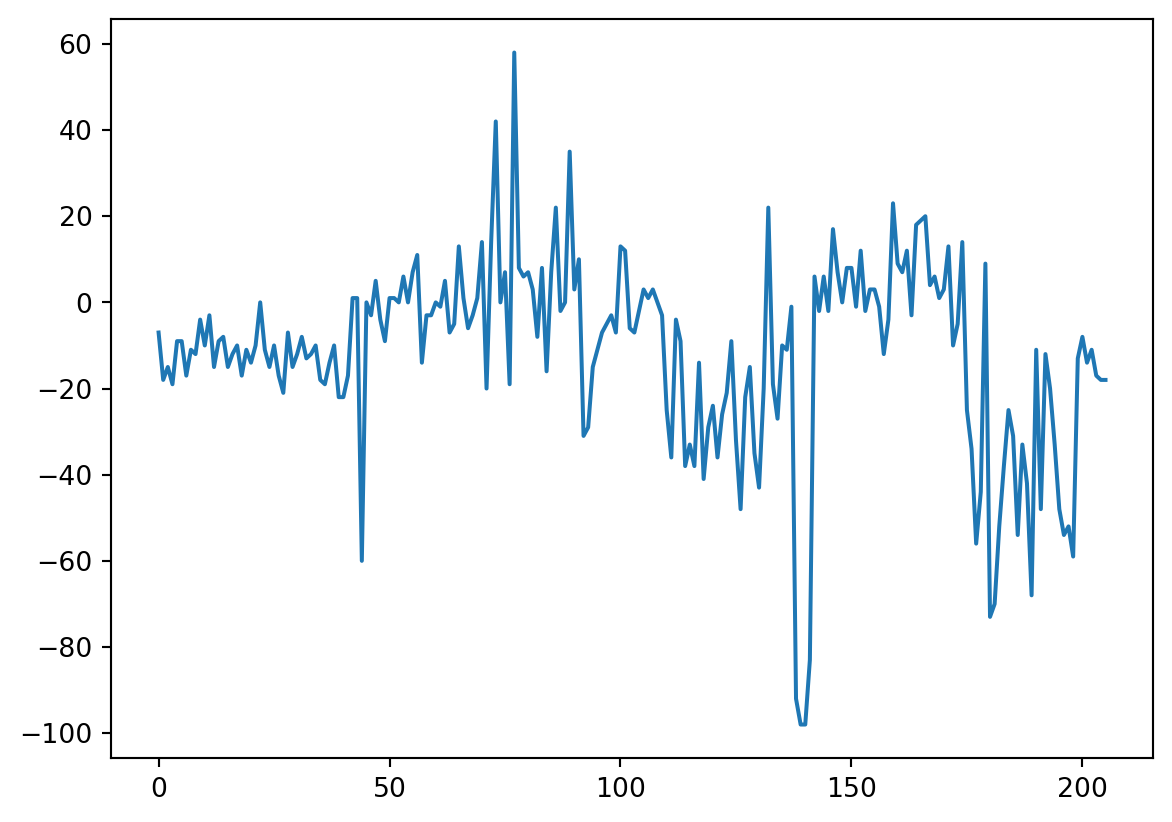
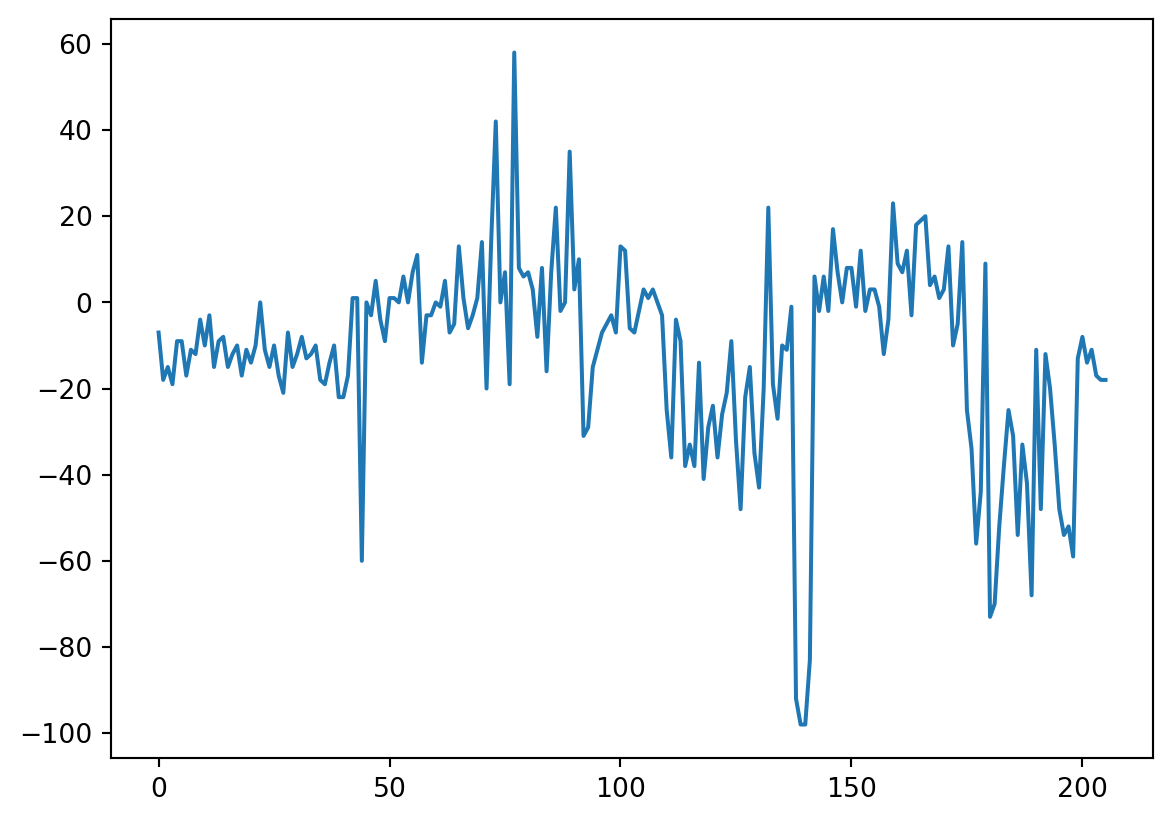
Zum Abschluss der Einheit wollen wir ein konkretes Beispiel für Data Science anschauen. Die Eu- Anomalie kennen vermutlich alle – sonst schnell mal nachschauen, was das ist. Wie sie berechnet wird, wird jedoch im Video erklärt. Am Ende werden wir ein sehr kurzes Programm haben, mit dem sich (i) die Eu-Anomalie analysieren lässt, und das (ii) sehr flexibel ist, d.h. mit dem wir nun prinzipiell die Eu-Anomalie jeder beliebigen Datenbank analysieren können. 

Import libraries and read the file

import pandas as pd
import matplotlib.pyplot as plt
import mag4 as mg
df = mg.get_data('Tanzania Craton Archean')

Data selection and clean-up
*Be aware that the syntax for the dropna() argument changed. Instead of dropna(0) it is now dropna(axis=0).

cISmEuGd = [.15, .057, .2]

smEuGdData = df.loc[:, ['Sm', 'Eu', 'Gd']].dropna(axis=0) / cISmEuGd

smEuGdData
Sm Eu Gd
11 34.600000 25.789474 21.10
12 28.066667 19.649123 19.80
13 41.933333 29.473684 27.35
14 49.266667 32.280702 30.60
15 26.800000 20.526316 18.50
... ... ... ...
230 49.200000 33.508772 28.60
231 54.200000 37.017544 28.55
232 52.400000 34.035088 29.15
233 47.800000 30.877193 27.25
234 45.333333 28.947368 25.55

206 rows × 3 columns

len(smEuGdData)
206

Calculate the anomaly and convert to a pandas dataframe

res = []

for n in range(len(smEuGdData)):
    l = smEuGdData.iloc[n].tolist()
    euAn = ((l[1] / ((l[0] + l[2]) / 2)) - 1) * 100
    res.append(round(euAn))


res
[-7,
 -18,
 -15,
 -19,
 -9,
 -9,
 -17,
 -11,
 -12,
 -4,
 -10,
 -3,
 -15,
 -9,
 -8,
 -15,
 -12,
 -10,
 -17,
 -11,
 -14,
 -10,
 0,
 -11,
 -15,
 -10,
 -17,
 -21,
 -7,
 -15,
 -12,
 -8,
 -13,
 -12,
 -10,
 -18,
 -19,
 -14,
 -10,
 -22,
 -22,
 -17,
 1,
 1,
 -60,
 0,
 -3,
 5,
 -4,
 -9,
 1,
 1,
 0,
 6,
 0,
 7,
 11,
 -14,
 -3,
 -3,
 0,
 -1,
 5,
 -7,
 -5,
 13,
 1,
 -6,
 -3,
 1,
 14,
 -20,
 14,
 42,
 0,
 7,
 -19,
 58,
 8,
 6,
 7,
 3,
 -8,
 8,
 -16,
 7,
 22,
 -2,
 0,
 35,
 3,
 10,
 -31,
 -29,
 -15,
 -11,
 -7,
 -5,
 -3,
 -7,
 13,
 12,
 -6,
 -7,
 -2,
 3,
 1,
 3,
 0,
 -3,
 -25,
 -36,
 -4,
 -9,
 -38,
 -33,
 -38,
 -14,
 -41,
 -29,
 -24,
 -36,
 -26,
 -21,
 -9,
 -32,
 -48,
 -22,
 -15,
 -35,
 -43,
 -20,
 22,
 -19,
 -27,
 -10,
 -11,
 -1,
 -92,
 -98,
 -98,
 -83,
 6,
 -2,
 6,
 -2,
 17,
 7,
 0,
 8,
 8,
 -1,
 12,
 -2,
 3,
 3,
 -1,
 -12,
 -4,
 23,
 9,
 7,
 12,
 -3,
 18,
 19,
 20,
 4,
 6,
 1,
 3,
 13,
 -10,
 -5,
 14,
 -25,
 -34,
 -56,
 -44,
 9,
 -73,
 -70,
 -52,
 -38,
 -25,
 -31,
 -54,
 -33,
 -42,
 -68,
 -11,
 -48,
 -12,
 -20,
 -33,
 -48,
 -54,
 -52,
 -59,
 -13,
 -8,
 -14,
 -11,
 -17,
 -18,
 -18]

Visualise the data

plt.plot(res)

All in one (or at least the last 3 parts in one)

cISmEuGd = [.15, .057, .2]
smEuGdData = df.loc[:, ['Sm', 'Eu', 'Gd']].dropna(axis=0) / cISmEuGd

res = []

for n in range(len(smEuGdData)):
    l = smEuGdData.iloc[n].tolist()
    euAn = ((l[1] / ((l[0] + l[2]) / 2)) - 1) * 100
    res.append(round(euAn))
    
plt.plot(res)
plt.show()
I think that understanding and preparing the actual calculation, i.e., everything before coding requires great attention and time. The code might still also take some time. But without concentrated preparation, coding will quickly become futile.

.dropna(axis=0, how=‘any’)

.dropna()

We now want to calculate the anomaly of every REE element.
The element of interest shall be selectable from a drop-down menu.
Start with importing the required libraries and/or commands. Below we will ned the REE CI concentrations. Start with extracting these.
To do this, read in the CI data from 'Chondrite Element Abundances' using mag4 into the variable ‘cIdf’.
Define a command to find the index of a specific element.
(Maybe store this handy posRow() command in your 'mineralogyModule.py'.)
Use this command to select only the datasates with the SEE.
Extract the CI REE (-> from La to Lu) concentrations as a list from the imported chondrite element abundances file. Make sure you extracted the correct values.
Delete Pm from this list.
Below follows the program from the corresponding unit. Convert this program into a command called 'calcREEAnomaly'. Input to the command shall only be the REE element for which the anomlay shall be calculated, and the dataset, for which the anomaly shall be calculated.
As this is not trivial, you might want to have a peak at the solution.
As we only have the REE for which the anomaly shall be calculated, we first need modify the program to accomodate for this.
First, produce a list of the names of the REE without Pm.
Using the input REE, produce the list of the 3 REE called ‘threeREE’ required for calculating the anomaly.
You can then do the same with the cIREE list, i.e., selcet the REE values for these elements.

Then modify the program above:
(i) so that the 3 REE are now automaticall chosen depending on the single REE input.
(ii) so that the 3 REE CI concentrations are now automaticall chosen depending on the single REE input.

Finally you can convert this program into the command 'calcREEAnomaly' that calculates the anomaly of every REE (except for two, do you know which?), depending on user input.
Read in the 'West African Cratons' dataset as df.
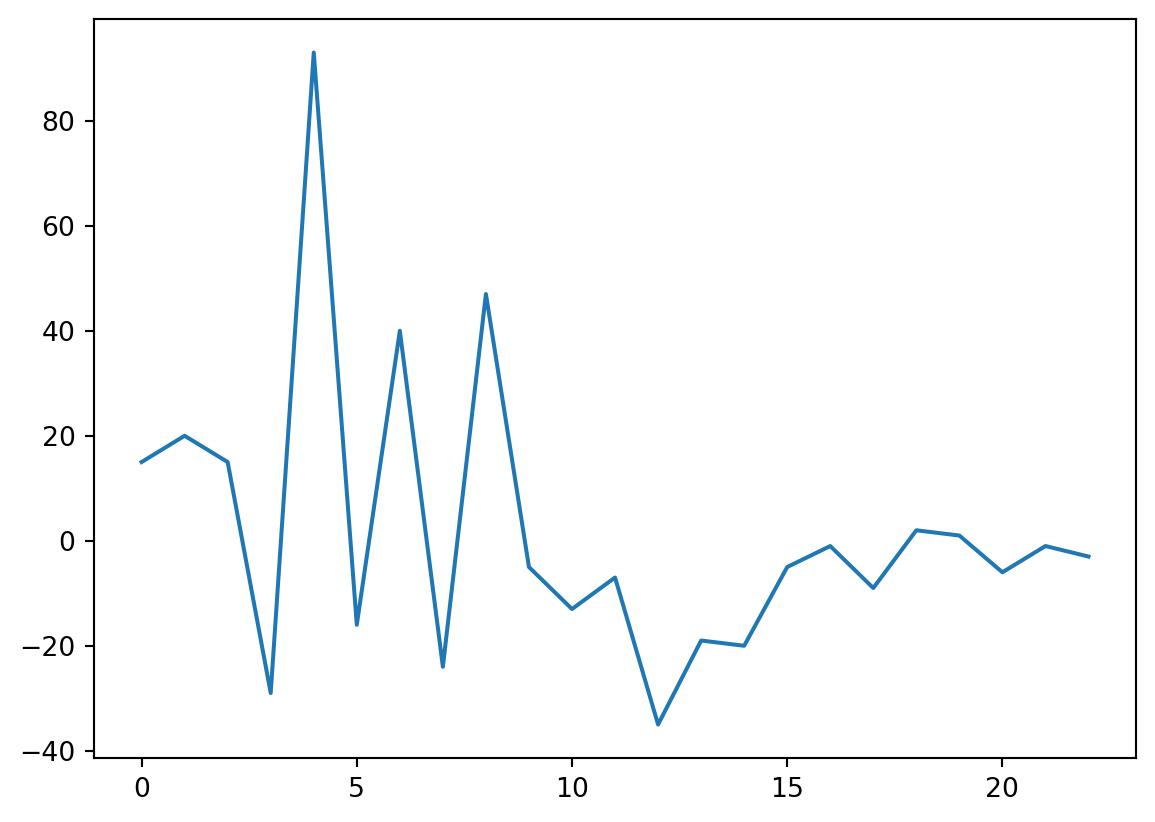
Finally test your freshly defined command with e.g., calcREEAnomaly('Eu').
Expand your command so it displays a graph rather than a list of values.
Test wheter it works.
‘mineralogyModule’. (Maybe add this command to your 'mineralogyModule.py'.)
And for easier usage, make it interactive, where you can choose the element from a drop-down menu – that displays only thos elements, for which anomalies can be calculated.
(You might occassionally get an error, don’t worry, just try another element. Most should work. The error is most likely because of some missing or zero values. These could be avoided with accoriding ‘if’ statements and some kind of informative message.)

import pandas as pd

Be aware that the key is no longer 'Element', but 'symbol'

cIdf = mg.get_data('Chondrite Element Abundances')

def posRow(name):
    return cIdf.index[cIdf['symbol'] == name][0]
cIdf.loc[posRow('La'):posRow('Lu')]
z symbol unit CI solar abundance CM CV CO CK CR CH H L LL EH EL R K
56 57 La ppm 0.235 0.44200 0.320 0.469 0.380 0.460 0.310 0.290 0.301 0.318 0.330 0.240 0.196 0.310 0.320
57 58 Ce ppm 0.620 1.19100 0.940 1.190 1.140 1.270 0.750 0.870 0.763 0.970 0.880 0.650 0.580 0.830 NaN
58 59 Pr ppm 0.094 0.17310 0.137 0.174 0.140 NaN NaN NaN 0.120 0.140 0.130 0.100 0.070 NaN NaN
59 60 Nd ppm 0.460 0.83550 0.626 0.919 0.850 0.990 0.790 NaN 0.581 0.700 0.650 0.440 0.370 NaN NaN
60 61 Pm NaN NaN NaN NaN NaN NaN NaN NaN NaN NaN NaN NaN NaN NaN NaN NaN
61 62 Sm ppm 0.150 0.25420 0.204 0.294 0.250 0.290 0.230 0.185 0.194 0.203 0.205 0.140 0.149 0.180 0.200
62 63 Eu ppm 0.057 0.09599 0.078 0.105 0.096 0.110 0.080 0.076 0.074 0.080 0.078 0.052 0.054 0.072 0.080
63 64 Gd ppm 0.200 0.33880 0.290 0.405 0.390 0.440 0.320 0.290 0.275 0.317 0.290 0.210 0.196 NaN NaN
64 65 Tb ppm 0.037 0.05701 0.051 0.071 0.060 NaN 0.050 0.050 0.049 0.059 0.054 0.034 0.032 NaN NaN
65 66 Dy ppm 0.250 0.39220 0.332 0.454 0.420 0.490 0.280 0.310 0.305 0.372 0.360 0.230 0.245 0.029 NaN
66 67 Ho ppm 0.056 0.08666 0.077 0.097 0.096 0.100 0.100 0.070 0.074 0.089 0.082 0.050 0.051 0.059 NaN
67 68 Er ppm 0.160 0.25040 0.221 0.277 0.305 0.350 NaN NaN 0.213 0.252 0.240 0.160 0.160 NaN NaN
68 69 Tm ppm 0.025 0.03700 0.035 0.048 0.040 NaN NaN 0.040 0.033 0.038 0.035 0.024 0.023 NaN NaN
69 70 Yb ppm 0.160 0.24840 0.215 0.312 0.270 0.320 0.220 0.210 0.203 0.226 0.230 0.154 0.157 0.216 0.215
70 71 Lu ppm 0.025 0.03738 0.033 0.046 0.039 0.046 0.032 0.030 0.033 0.034 0.034 0.025 0.025 0.032 0.033
cIREE = cIdf.loc[posRow('La'):posRow('Lu'), 'CI'].tolist()

cIREE.pop(4)

cIREE
[0.235,
 0.62,
 0.094,
 0.46,
 0.15,
 0.057,
 0.2,
 0.037,
 0.25,
 0.056,
 0.16,
 0.025,
 0.16,
 0.025]
cISmEuGd = [.15, .057, .2]
smEuGdData = df.loc[:, ['Sm', 'Eu', 'Gd']].dropna(axis=0) / cISmEuGd

res = []

for n in range(len(smEuGdData)):
    l = smEuGdData.iloc[n].tolist()
    euAn = ((l[1] / ((l[0] + l[2]) / 2)) - 1) * 100
    res.append(round(euAn))

Be aware that the key is no longer 'Element', but 'symbol'

ree = cIdf.loc[posRow('La'):posRow('Lu'), 'symbol'].tolist()

ree.pop(4)
ree
['La',
 'Ce',
 'Pr',
 'Nd',
 'Sm',
 'Eu',
 'Gd',
 'Tb',
 'Dy',
 'Ho',
 'Er',
 'Tm',
 'Yb',
 'Lu']
# input REE
el = 'Eu'

# either
leftREE = ree[ree.index(el) - 1]
rightREE =ree[ree.index(el) + 1]

threeREE = [leftREE, el, rightREE]
print(threeREE)

# or
threeREE = [ree[ree.index(el) - 1], el, ree[ree.index(el) + 1]]

print(threeREE)
['Sm', 'Eu', 'Gd']
['Sm', 'Eu', 'Gd']
el = 'Eu'

cISmEuGd = [cIREE[ree.index(el) - 1], cIREE[ree.index(el)], cIREE[ree.index(el) + 1]]
threeREE = [ree[ree.index(el) - 1], el, ree[ree.index(el) + 1]]

smEuGdData = df.loc[:, threeREE].dropna(axis=0) / cISmEuGd

res = []

for n in range(len(smEuGdData)):
    l = smEuGdData.iloc[n].tolist()
    euAn = ((l[1] / ((l[0] + l[2]) / 2)) - 1) * 100
    res.append(round(euAn))
def calcREEAnomaly(el):
    cISmEuGd = [cIREE[ree.index(el) - 1], cIREE[ree.index(el)], cIREE[ree.index(el) + 1]]
    threeREE = [ree[ree.index(el) - 1], el, ree[ree.index(el) + 1]]

    smEuGdData = df.loc[:, threeREE].dropna(axis=0) / cISmEuGd

    res = []

    for n in range(len(smEuGdData)):
        l = smEuGdData.iloc[n].tolist()
        euAn = ((l[1] / ((l[0] + l[2]) / 2)) - 1) * 100
        res.append(round(euAn))
    
    return res
df = mg.get_data('West African Craton')
calcREEAnomaly('Eu')
[-13,
 2,
 6,
 21,
 -65,
 -11,
 -23,
 15,
 -64,
 -46,
 12,
 -5,
 13,
 12,
 12,
 10,
 0,
 7,
 -2,
 -5,
 12,
 -3,
 -1]
import matplotlib.pyplot as plt
def calcREEAnomaly(el):
    cISmEuGd = [cIREE[ree.index(el) - 1], cIREE[ree.index(el)], cIREE[ree.index(el) + 1]]
    threeREE = [ree[ree.index(el) - 1], el, ree[ree.index(el) + 1]]

    smEuGdData = df.loc[:, threeREE].dropna(axis=0) / cISmEuGd

    res = []

    for n in range(len(smEuGdData)):
        l = smEuGdData.iloc[n].tolist()
        euAn = ((l[1] / ((l[0] + l[2]) / 2)) - 1) * 100
        res.append(round(euAn))
    
    plt.plot(res)
    
    return plt.show()
calcREEAnomaly('Sm')

from ipywidgets import interact
interact(calcREEAnomaly, el = ['Ce', 'Pr', 'Nd', 'Sm', 'Eu', 'Gd', 'Tb', 'Dy', 'Ho', 'Er', 'Tm', 'Yb'])
<function __main__.calcREEAnomaly(el)>
import matplotlib.pyplot as plt

xData = [2, 5, 3, 6, 9]
yData = [6, 2, 7, 4, 1]

plot(xData, yData)

show()

plt.’ is missing before ‘plot(…)’ and ‘show()’

l = [4, 5, 7, 2, 1]

for i in range[len[l]]:
    print(i + 4)

range and len need round brackets -> range(len(l))